

EXA: The Infinite Instrument
Step into EXA, an immersive musical studio where you can compose, record, and perform music using expressive instruments of your own design.
AI 유저 감성 및 재미 분석
"아직 유저 리뷰 분석이 없습니다."
Latest Posts
Detailed Description
This app has been under constant development since early 2016, continually growing and improving. Despite being in Early Access, the app is polished, stable, and packed full of features. Here's a look at the basics of making music with EXA in VR:
RINGERS & THEIR SOUNDS
EXA’s musical shapes are called ringers. They make sound when you hit or interact with them using one of the various playing tools (like a mallet, violin bow, or proximity tool). The ringers in EXA react to the velocity and angle that you play them, and they provide an extremely responsive, zero-latency playing experience. (Note: external audio-routing apps can introduce latency, please disable them or adjust their settings!)
You can change the sound that a ringer produces (like a drum, piano, guitar, synth, etc.) by choosing a different Soundfont (SF2) or sample (WAV, AIFF, OGG) as its audio source. EXA ships with 1,000+ built-in sounds, and encourages you to import your own! You can change a ringer's pitch by setting it to a specific note, shifting it up or down, or by applying a particular scale/interval across several selected ringers.
CREATING INSTRUMENTS
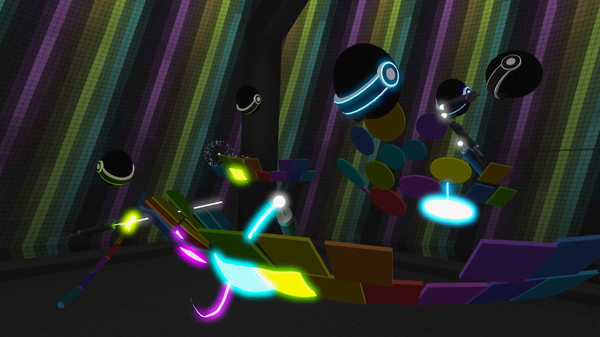
Ringers are the main building-block for creating your own custom instruments. There are four available ringer shapes, and you can move and resize them however you want. Sketch new ringers out of thin air using the draw tool, and use the group and clone features to assist your instrument-creation process.
EXA’s virtual space gives you incredible flexibility for designing entirely new and “impossible” musical instruments. You’re free to break away from traditional instrument structures, and instead create instruments that are perfectly suited to the way you want to move, the notes you want to play, and the musical performance you want to compose.
You could arrange ringers into curved rows that wrap around you, or into large grids, or stacks that form chords, or guitar-like rows of strings, or radial patterns that you play with circular motions… the possibilities are endless.
Of course, you don’t need to create everything yourself. EXA ships with several pre-built layouts (full musical scenes) and bundles (reusable instruments) that you can use right away. If you do create an instrument, however, you can save it as a new bundle and reuse it anywhere you want.
RECORDING AND PLAYING LOOPS
Recording and replaying loops is at the heart of EXA’s music-making experience. As you record a loop, EXA captures the notes you play and the motions you make while performing. Then, whenever you play the recorded loop, you'll see (optionally) a “robot” performer repeating the exact motions that you did.
To record a loop, hit the loop recorder’s red ringer. It displays a countdown to the first metronome beat of the next measure. Recording begins on that beat, and continues until you hit the red ringer again (or use the “auto-stop” feature). At this point, the loop recorder becomes a playable loop. You can apply new sounds to it, adjust its volume, change its duration, quantize its notes to align with the metronome, and more.
EXA's sequencer interface allows you to schedule loop playback and assemble full songs. You can link each sequencer row to a particular loop, then add playback events within that row. As the sequencer plays, each sequencer row sends those events (when the playhead reaches them) to their linked loop.
REMIX AND MORE
With EXA’s custom instruments, recorded loops, robot performers, and powerful interfaces to schedule playback and keep it all organized, you can compose and produce entire “virtual band” music performances.
Watch and move through these performances again and again, customize them, share them, and even export them into other apps! The EXA Remix package allows third-party developers to load, display, and customize full EXA performances within their Unity-based software.
There’s so much more to explore in EXA! Export loops and songs to WAV audio, 64-channel live MIDI output, sleek user interfaces, fast and efficient workflows, in-app audio device selection, teleport and slide-based locomotion, high-quality display mode for recording videos or performing live… and more being introduced all the time.
EXA thrives on feedback, ideas, and wish-lists from players like you! Share your thoughts with Zach (the EXA dev) and the community using the EXA discussion board.
That's it! Now that you know the basics, it's time to step into EXA, and start making music with your very own infinite instrument.
Latest Resources
Latest News
Related Games










Genres & Categories
Screenshots


EXA: The Infinite Instrument FAQ
When was EXA: The Infinite Instrument released?
EXA: The Infinite Instrument was released on 1/14/2020.
Is EXA: The Infinite Instrument a good game?
EXA: The Infinite Instrument has 97% positive Steam reviews based on 90 reviews.
What is the GameWorld (gS) score of EXA: The Infinite Instrument?
EXA: The Infinite Instrument has a GameWorld (gS) score of 71 out of 100, aggregated from Steam, IGDB, Metacritic and more.
What genre is EXA: The Infinite Instrument?
EXA: The Infinite Instrument is a Casual, Indie, Audio Production game.
Who developed EXA: The Infinite Instrument?
EXA: The Infinite Instrument was developed by Aesthetic Interactive, Zach Kinstner and published by Aesthetic Interactive.
Does EXA: The Infinite Instrument support multiplayer?
EXA: The Infinite Instrument supports single-player.
Where can I find guides, Korean patches and downloads for EXA: The Infinite Instrument?
On the EXA: The Infinite Instrument page at GameWorld you can browse community guides and download resources (Korean patches, trainers, save files and more), or upload your own.