

34
Desktop Wanwano-
Desktop Mascot Wanwano. Cute characters move around under your PC screen.
AI 유저 감성 및 재미 분석
"아직 유저 리뷰 분석이 없습니다."
Latest Posts
No posts yet.
Detailed Description
Desktop Mascot Wanwano.
Cute characters move around under your PC screen.
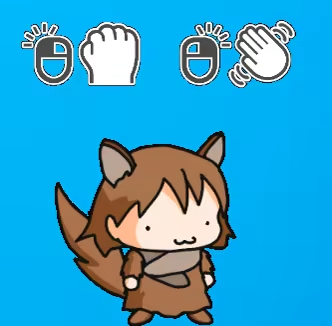
Wanwano
{STEAM_APP_IMAGE}/extras/setumei7.jpg
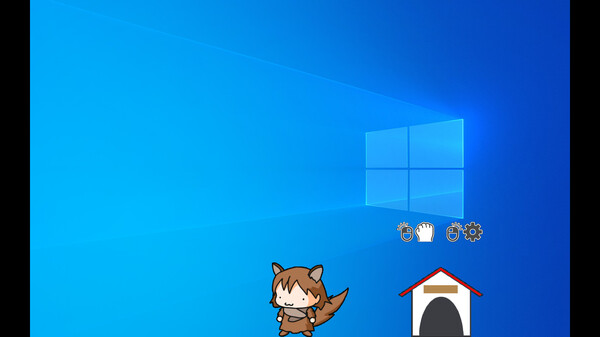
Left drag: Grab
Right-click (when in standby mode): stroke.
Hut
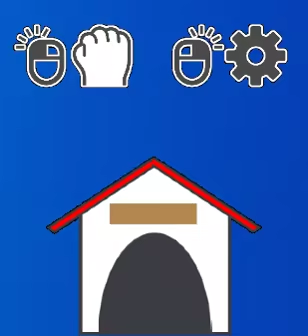
Left drag: Grab
Right click: Menu
Menu

1.Photo
2.Fishing
3.Options
4.Save & Exit: Saves and exits.
5.Close the menu.
Photo menu

1.Photo: See a record of your dog's activities.
2.Likability: You can increase your likability by feeding wanwano.
3.Return to the previous menu.
4.Close the menu.
Photo
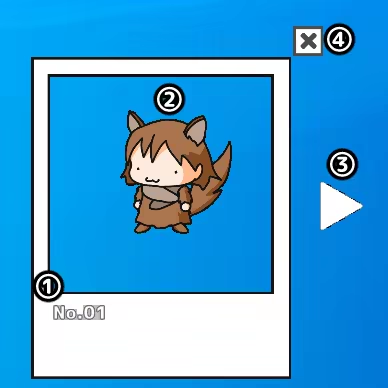
1.Action Number
2.moving picture
3.Next
4.Close the menu.
Fishing menu

1.Auro: Fishing is done automatically.
2.Manual: Fishing is done manually.
3.Fish Encyclopedia: View the fish you have caught.
4.Total number of fish caught.
When fishing, you can't grab Wanwano.
You can't grab the hut when fishing.
・Auto fishing

It automatically continues to catch fish.
To exit, press the Exit button above Hut.
・Manual fishing
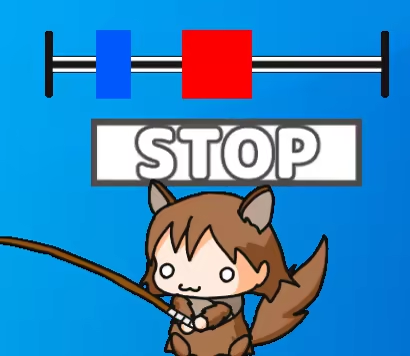
A fish will be hooked over time.
Press the Stop button when the blue bar overlaps the red bar.
・Fish Encyclopedia
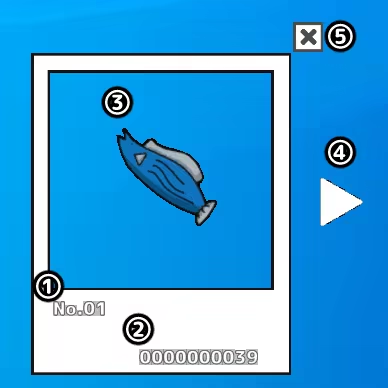
1.Fish number
2.Number of fish caught
3.Fish Pictures
4.Next
5.Close the menu.
Options

1.Small/2.Big:Change the size of the character.
3.Description Icon:Show/hide the description icon when the cursor is hovered over the Wanwano and the hut.
4.Monitor change:Switches the monitor if there are multiple monitors.
Other
F12key: Move the position of the wanwano and the hut to the center.
Cute characters move around under your PC screen.
Wanwano
{STEAM_APP_IMAGE}/extras/setumei7.jpg
Left drag: Grab
Right-click (when in standby mode): stroke.
Hut
Left drag: Grab
Right click: Menu
Menu
1.Photo
2.Fishing
3.Options
4.Save & Exit: Saves and exits.
5.Close the menu.
Photo menu
1.Photo: See a record of your dog's activities.
2.Likability: You can increase your likability by feeding wanwano.
3.Return to the previous menu.
4.Close the menu.
Photo
1.Action Number
2.moving picture
3.Next
4.Close the menu.
Fishing menu
1.Auro: Fishing is done automatically.
2.Manual: Fishing is done manually.
3.Fish Encyclopedia: View the fish you have caught.
4.Total number of fish caught.
When fishing, you can't grab Wanwano.
You can't grab the hut when fishing.
・Auto fishing
It automatically continues to catch fish.
To exit, press the Exit button above Hut.
・Manual fishing
A fish will be hooked over time.
Press the Stop button when the blue bar overlaps the red bar.
・Fish Encyclopedia
1.Fish number
2.Number of fish caught
3.Fish Pictures
4.Next
5.Close the menu.
Options
1.Small/2.Big:Change the size of the character.
3.Description Icon:Show/hide the description icon when the cursor is hovered over the Wanwano and the hut.
4.Monitor change:Switches the monitor if there are multiple monitors.
Other
F12key: Move the position of the wanwano and the hut to the center.
Latest Resources
No resources available.
Latest News
No related news.










Genres & Categories
Screenshots


Desktop Wanwano- FAQ
When was Desktop Wanwano- released?
Desktop Wanwano- was released on 7/16/2024.
Is Desktop Wanwano- a good game?
Desktop Wanwano- has 100% positive Steam reviews based on 1 reviews.
What is the GameWorld (gS) score of Desktop Wanwano-?
Desktop Wanwano- has a GameWorld (gS) score of 34 out of 100, aggregated from Steam, IGDB, Metacritic and more.
What genre is Desktop Wanwano-?
Desktop Wanwano- is a Casual game.
Who developed Desktop Wanwano-?
Desktop Wanwano- was developed by WINGLAY.
Does Desktop Wanwano- support multiplayer?
Desktop Wanwano- supports single-player.
Where can I find guides, Korean patches and downloads for Desktop Wanwano-?
On the Desktop Wanwano- page at GameWorld you can browse community guides and download resources (Korean patches, trainers, save files and more), or upload your own.